

Ergonomic Injury Prevention Guide

January 18, 2022

Share this Article:

Does your career require extended time working at your desk? If so, you understand the potential perils, including a stiff neck, headaches, and sore back at the end of the day.


Fortunately, you can take steps to ergonomically set up your office that can reduce injuries and protect your overall health.

Four Fundamentals of Ergonomic Office Set-Up

When you’re designing your office, an ounce of prevention is worth a pound of cure, as the saying goes. Merriam-Webster defines ergonomics as “a science that deals with designing and arranging things so that people can use them easily and safely.”


This article will discuss four fundamentals to consider for setting up your office for ergonomic success; head and neck, back, hands and wrists, and movement.


1. Head and Neck Position

Neck strain is common when you’re sitting at a desk for long periods. To reduce your risk of neck injury, keep your head vertical to your neck when you’re working. You want to have a proper desk posture at all time.


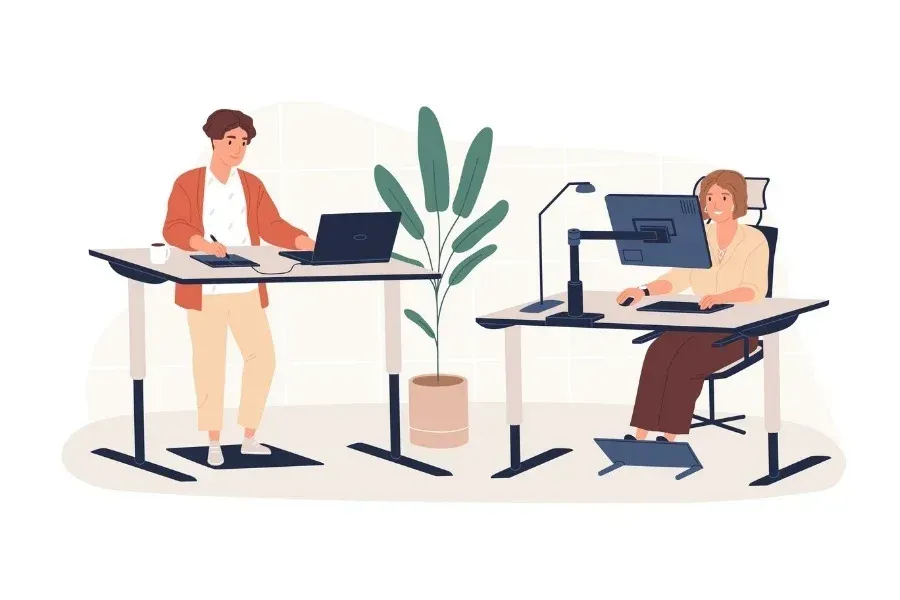
One tip to do this if you’re using a laptop is investing in a laptop riser and using an external keyboard and mouse instead of bending your neck down to the screen. Have you heard the term “text neck” that occurs from hunching over your cell phone?


A similar thing happens when your computer screen is too low, and the angle of your head puts more weight on your neck and spine. Your head weighs approximately 10-12 pounds when you sit in a neutral position. However, if you tip your head down just 15 degrees, that weight increases to 26 pounds of pressure on your cervical spine. If your head is tilted 30 degrees, that weight increases to 40 pounds of force.


This added strain on your neck and spine leads to damage and pain over time. To avoid this, keep your head vertical by placing your computer screen at eye level. And if you have two screens, keep the primary screen centered right in front of you and the secondary screen off to your left or your right.


Monitor tips to consider:


  • Align the top of the monitor screen with your forehead, and use a riser if needed.
  • Place the monitor 20-40 inches from your face.
  • Place the monitor at a right angle or away from windows and task lights to reduce glare.


2. Back and Seat Position

Back and seat positioning are critical to reducing fatigue and pain. If you were trained to “sit up tall,” you may find this section interesting because sitting at a 90-degree angle is not good for your body.


If your chair doesn’t already have one, use a seat cushion to distribute your weight more evenly. You can purchase orthopedic seats that tilt your pelvis into a more natural position or seat cushions with tailbone cutouts for more comfort. Then, when you’re sitting in your chair, make sure your legs and thighs are parallel to your seat cushion, which reduces leg pain. Also, ensure that your seat isn’t hitting the back of your knees because it can cause your ankles and feet to swell.


Lumbar support pillows are also helpful because they accommodate the natural curve in your lower back when you sit.


If your feet don’t touch the floor, use a stool to place your feet on because your legs shouldn’t be dangling. Ideally, your feet should sit flat on the floor with your legs and hips at 90° to 100°, and you can purchase an adjustable footrest to help keep your legs in this ergonomic position.


3. Hands and Wrists

The American College of Rheumatology reports that carpal tunnel syndrome affects between 4-10 million Americans. It causes numbness in the fingers, hand weakness, loss of feeling, and loss of hand function. It has the potential to derail careers, but with ergonomic hand and wrist positioning, you can protect yourself.


When you’re working, it’s essential that your hands and wrists are in a neutral position as much as possible. Your shoulders should be in a resting position rather than hunched, and keep your arms at 90 degrees with your elbows bent and wrists neutral. Your arms shouldn’t bend to the side or across the midline of your body while you’re working.


Additional tips include:


  • Use an ergonomic mouse rather than a traditional mouse to prevent a bend in your wrist.
  • As we mentioned above, use an external keyboard if you’re using a laptop so you can keep your arm ergonomically positioned.
  • Be mindful when choosing new ergonomic devices such as a keyboard or mouse. It is important to look at how the entire arm is supported all the way from the wrist to shoulder. Making a positive change to one area, has potential to negatively impact another area if not properly assessed. 


4. Behavior

The last ergonomic fundamental to reduce injuries is your behavior. Pace yourself using short, frequent breaks that are key to prevent repetition injuries and muscle fatigue. It also keeps your circulation flowing and increases your work performance.


Research reveals that taking a short break every 20 minutes to stand and stretch is helpful, but if you can walk for a minute or two as well, it’s better.


Sit-stand desks have become quite popular, and if you use them properly, they can benefit you. Keep in mind that standing strains your body more than sitting, and people tend to lean when they are standing for more than eight minutes. So if you’re going to use a sit-stand desk, it’s best to sit for 20 minutes, followed by 8 minutes of standing, followed by 2 minutes of moving around.


You only get one body, so invest in your health with the ergonomic setup tips we’ve discussed here to reduce injuries. Be sure to incorporate all of the four fundamental customizations for optimal results. For example, if you get a chair that keeps you in a neutral position, but you need to bend your neck to view the computer monitor, you will still run into problems.


Learn How You Can Set Up Your Office for Success

At Rock Valley PT, we are committed to equipping you to succeed at work, at home, and on the field. Our therapists are experts on ergonomic positioning that’s best for your health, and we are available to assist you with ideas for creating an ergonomic office space.


For an appointment or more information, contact us today.

Connect With Us:

More Tips, Insights & Recovery Advice

Man standing in front of Rock Valley Physical Therapy sign in a blue-walled office lobby.
By Kylie Williams June 10, 2026
“Max has been the best physical therapist I have had,’’ she said. “He sincerely listened to what I had to say and was knowledgeable when I asked him questions. He continually asked how the exercises and treatments were feeling. He knew the pain I was in because by surgery time, I could barely walk, sit, or sleep."
By ashley johnson June 4, 2026
We often think of physical therapy as something we only need after a sports injury or a surgery. While PTs are certainly experts in fixing knees and backs, their role in your health goes much deeper. In fact, one of the most important muscles a physical therapist can help you strengthen isn't in your leg or your arm, it’s your heart. Heart disease remains the leading cause of death globally. According to recent data from the American Heart Association, someone in the United States dies of heart disease every 34 seconds. The good news? A lot of cardiovascular disease is preventable through lifestyle changes, with regular movement being one of the most powerful medicines out there. The Challenge of Getting Started Current health guidelines recommend that ad ults get at least 150 minutes of moderate-intensity aerobic activity per week. H owever, for many, that goal feels out of reach. Maybe you want to start walking or cycling, but an old nagging injury flares up every time you try. Or it could be the fear of "doing too much" after a health scare that keeps you on the couch. This is where physical therapy becomes your heart's best friend! How a Physical Therapist Supports Your Heart A physical therapist is a movement specialist. They don't just look at a painful joint, they look at how your whole body moves and how your heart and lungs respond to that movement. Here is how they help you go from staying still to getting active: Before Activity: Before you start a new exercise routine, a PT can assess your balance, strength, and cardiovascular response. This makes sure you start at a level that is challenging enough to strengthen your heart but safe enough to avoid burnout or injury. Overcoming Pain: Many people stop exercising because of joint pain. A PT identifies the root cause of that pain, whether it’s a weakness in the hip causing knee pain or poor posture affecting your breathing, and provides a plan to fix it so you can keep your heart rate up without the aches. Recovery and Beyond: If you have experienced a major health event like a heart attack, stroke, or are undergoing cancer treatment, exercise is vital but can be intimidating. Research highlights that supervised exercise programs led by PTs significantly reduce fatigue and improve quality of life for people recovering from complex medical conditions. Managing Chronic Conditions: Physical therapy is increasingly used to help manage conditions that affect the heart indirectly, such as Type 2 diabetes and high blood pressure, by creating sustainable, low-impact movement plans. Movement is Medicine You don’t need to be a marathon runner to improve your heart health. Brisk walking, swimming, or even gardening can make a massive difference. The key is consistency and safety. If you’ve been hesitant to get moving, or if pain is standing in your way, consider a physical therapy evaluation. Your PT can help give your heart the support it needs to keep you moving for years to come.